
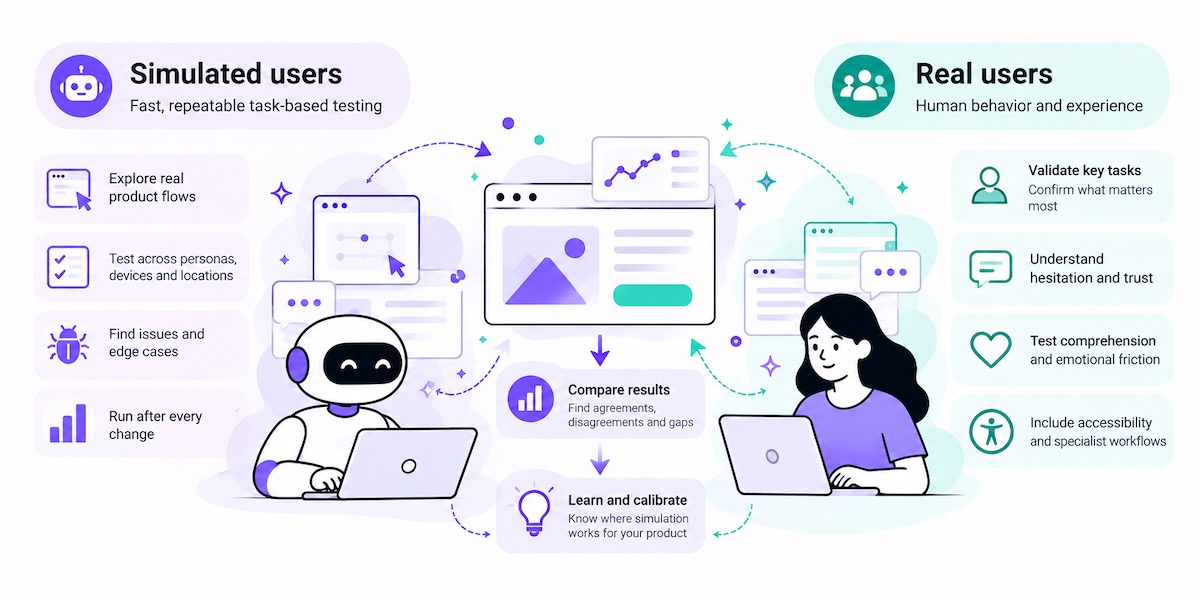

This guide explains how to combine the two methods so that each does the job it is suited for.
What this guide covers: task-based usability testing, where simulated users navigate a live product or prototype, try to reach a goal and report where they get stuck.
What it doesn't cover: synthetic interviews, survey panels, concept or pricing feedback, or asking AI personas for opinions. Those methods have different strengths and different risks.
For a broader introduction, see our guide to synthetic users.
The short answer:
- Simulated users are useful for fast, repeatable checks of navigation, task flows, form behavior, layouts and regressions after a change.
- A failed simulation is a lead to investigate. It may reveal an interface problem, or it may reflect a limitation of the agent.
- A passed simulation is not a guarantee. Simulated users can move past friction that stops real people.
- Real participants are still needed for trust, hesitation, cognitive load, emotional friction, accessibility with assistive technologies and specialist workflows.
- The two methods work best in one loop: simulate early and often, investigate failures, check selected tasks with real people, and use disagreements to learn where simulation can and cannot be relied on.
Contents
- 1. Why usability testing needs a faster feedback loop
- 2. What simulated users can and cannot tell you
- 3. Why real-user testing still matters
- 4. A hybrid usability testing workflow
- 5. What to test with simulated users vs. real participants
- 6. How much testing does a change need?
- 7. Where hybrid testing fits in the product cycle
- 8. Where hybrid testing doesn't fit
- 9. How Synthers AI supports hybrid usability testing
- 10. Hybrid usability testing checklist
- Frequently asked questions
1. Why usability testing needs a faster feedback loop
AI has changed how quickly teams can build. Coding activity has multiplied with AI tools, while releases have grown far less, partly because review, verification and other downstream steps absorb much of the extra capacity (what the 2026 research shows).
Usability testing is one of those downstream steps. A team can now produce a new flow or a redesigned screen in a day. Recruiting, scheduling and running sessions with real participants still takes much longer. The result is a growing gap: more changes reach production without anyone watching a person try to use them.
That gap came up repeatedly in our conversations with product designers, researchers, product managers and QA engineers while preparing the State of Usability Validation 2026 study. Most were open to simulated testing as an extra step before real-user research, on one condition: real users remain the final check for decisions that depend on human experience. Recruiting time, rather than willingness to test, was the most common constraint. These were informal conversations, not a representative survey, but the pattern was consistent.
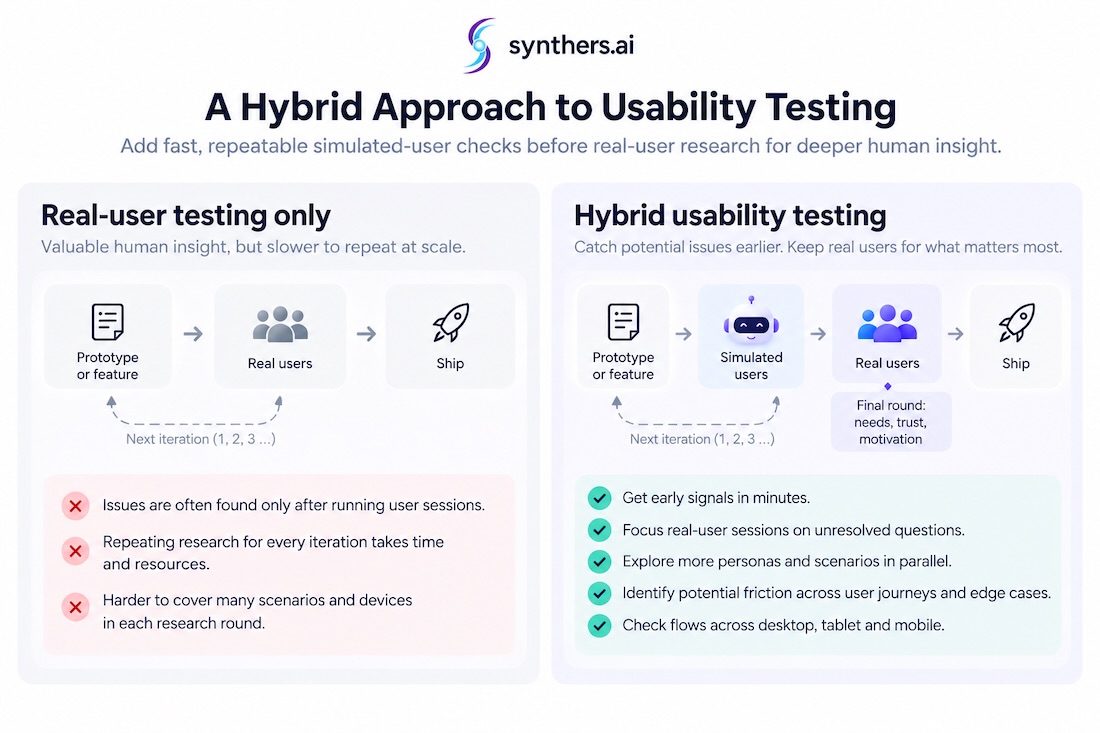
Hybrid usability testing is a response to that gap. It does not try to remove real participants from the process. It tries to make sure that the limited time with real participants is spent on the questions only people can answer.
2. What simulated users can and cannot tell you
In behavioral usability testing, a simulated user is an AI agent given a goal, a starting point and a persona, and asked to complete a task in a real interface: find a plan, sign up, change a setting, complete a checkout. What matters is what it does: where it clicks, where it hesitates, where it loops back and whether it reaches the goal.
That makes the output observable. You can watch the path, check the screen where the agent got stuck and decide whether the interface or the agent caused the problem.
What simulated behavior is useful for
- Navigation dead ends and broken paths. Links that lead nowhere, missing routes back, steps that block progress.
- Task flows with clear success criteria. Can the goal be reached, and by which paths?
- Form behavior and error states. Validation messages, required fields, edge-case inputs.
- Layouts across viewports. Interactions that work on desktop but break on mobile or tablet.
- Regressions. Flows that worked before a change and no longer do.
These are questions about what happens when someone interacts with the interface. They can be checked repeatedly, quickly and across many variations.
What simulated behavior cannot reliably tell you
- Trust and hesitation. Whether a real person feels confident entering payment details.
- Cognitive load and frustration. How hard a task feels, not just whether it was completed.
- Motivation and value. Whether people understand why they would use the product at all.
- Specialist judgement. Tasks that depend on professional knowledge or lived experience.
Recent research on AI personas points the same way: simulated users tend to be more agreeable and more uniform than real people, and believable behavior is not the same as an accurate prediction of what humans will do. We review that evidence in Synthetic User Bias: Where AI Personas Work and Where They Fail.
Read every result with this principle
Simulation results can be wrong in both directions. A simulated user may work through a task more systematically than a person would and move past friction that would stop a real participant. It may also fail for reasons that say more about the agent than the interface, such as missing an interaction, misreading an ambiguous task or getting stuck in a loop.
A failed simulation is a lead to investigate, not proof of a usability problem. A passed simulation is not proof that real users will succeed.
Everything else in this guide follows from that principle.
3. Why real-user testing still matters
Real-user testing is the reference point, but it is not error-free. Participants can believe they completed tasks they failed. Five users can reveal common problems in a narrow group but miss rare ones. Experienced researchers watching the same sessions often report different problems and rate their severity differently. We cover the evidence in User Research Bias: How Interviews and Usability Tests Can Mislead.
Two lessons carry over to hybrid testing:
- Separate observed behavior from reported experience. Task outcomes and interaction paths show what happened. Follow-up questions help explain what participants understood, expected, or found difficult. Neither source answers every question on its own.
- Different methods answer different questions. Real participants are essential when the question is about human experience: trust, effort, emotion and understanding. They may not be the most efficient first step for finding a broken link.
Hybrid testing is not a compromise between a good method and a cheap one. It assigns each method the questions it is better at answering.
4. A hybrid usability testing workflow
The workflow below turns that principle into a repeatable process for testing behavior on real product flows: simulate first, investigate what the simulations show, then bring the uncertain and consequential tasks to real people.
Step 1: Define the task and success criteria
Specify the user's goal, the starting context and the observable outcome that counts as success. "Find the cheapest plan for a team of five and reach the checkout page" can be evaluated. "Explore the pricing page" cannot.
Step 2: Run multiple simulations
Vary the personas, devices and starting conditions that are relevant to the task. More variations do not automatically mean better coverage. Choose the ones that represent real differences in how people arrive at the flow.
Step 3: Inspect failures and unexpected paths
For every failure, ask what caused it. Did the interface block the user, or did the agent misunderstand the task, miss an interaction or behave unlike a person? Review the screens and the path, not only the summary. Automated issue lists can include false alarms, so treat each reported problem as a claim to check.
Step 4: Look for repeatable patterns
Record whether an issue recurs across runs, varies between them or appears only under particular conditions, such as a specific device or persona. Consistency is a diagnostic signal. It does not prove a result is correct: repeated runs can repeat the same systematic error.
Step 5: Select tasks for real-user validation
Prioritize tasks that are:
- Uncertain: simulations disagree, or the cause of failure is unclear.
- Consequential: sign-up, payment, onboarding, data loss, anything costly to get wrong.
- Human-dependent: success depends on trust, understanding or effort rather than mechanics.
This is the core of the hybrid approach. Simulation results help decide what real participants should be asked to test.
Step 6: Compare behavior on the same tasks
Give real participants the same tasks and success criteria. Record where simulated and real participants agree, where they diverge and where they reveal different kinds of failure.
Step 7: Calibrate future use
The long-term benefit is calibration. Every comparison between simulated and real behavior helps your team understand which tasks simulation handles usefully, which results need human checking, and where the method consistently falls short. The goal is not to assume simulation is reliable; it is to build evidence about where you can rely on it.
Label the evidence you have
Each finding should say what supports it:
| Label | What it means |
|---|---|
| Simulation signal | Observed in simulated runs only |
| Human-checked | Observed or confirmed with a small number of real participants |
| Supported by further evidence | Also consistent with analytics, experiments, support data or larger studies |
A result from a handful of participants is useful, but it is not universally validated. The labels keep that distinction visible when findings travel to stakeholders.
5. What to test with simulated users vs. real participants
The dividing line is not simple versus complex tasks. It is whether the question can be evaluated through observable, repeatable interaction, or whether it requires evidence about real human experience.
| Task or issue | Simulated users | Real participants |
|---|---|---|
| Navigation dead ends and broken paths | Useful for rapid screening | Confirm confusing or ambiguous cases |
| Form validation and error recovery | Useful for checking defined flows and edge cases | Important when recovery depends on understanding or interpretation |
| Responsive layouts | Useful for checking interactions across viewports | Needed to understand real mobile behavior and context |
| Regressions after a change | Useful for repeatable checks | Targeted checks for consequential changes |
| Trust at sign-up or payment | Can expose missing information or flow issues | Needed to understand actual trust and hesitation |
| Cognitive load and emotional friction | Limited proxy; treat as a hypothesis | Essential when these are the research outcomes |
| Accessibility with assistive technology | Can support preliminary automated checks | Direct testing with relevant assistive technologies and users is necessary |
| Specialist or high-risk workflows | Useful only for clearly defined preliminary checks | Expert and user validation should lead |
6. How much testing does a change need?
Not every change needs the same depth of evidence. Consider how many users the change affects, how costly a mistake would be, how easy it is to reverse, and how well the chosen method represents the people and behavior that matter.
- Routine simulation checks. Low-risk, easily reversible changes to well-understood flows, and repeatable regression tasks.
- Simulation plus targeted human checks. Important flows with uncertain results or questions about comprehension and effort.
- Simulation plus a full round of usability testing. New or substantially redesigned core journeys, such as onboarding, checkout or account setup.
- Dedicated research. Decisions that depend on needs, motivation or market fit, where behavioral testing is only one input.
This ladder is a starting point, not a rule. Its purpose is to make the choice deliberate instead of defaulting to "test everything with people" or "test nothing."
When simulated and real users disagree
Disagreements are some of the most useful results in hybrid testing.
| Result | How to interpret it |
|---|---|
| Simulated users pass; real participants fail | Investigate missed friction, comprehension, trust or other differences in human behavior, and treat similar tasks as needing human checks in future. |
| Simulated users fail; real participants pass | Determine whether the agent failed because of its limitations or exposed a genuine interface issue. |
| Both fail similarly | Stronger reason to investigate the interface, but check whether the task definition or testing setup caused the shared failure. |
| Both pass | Evidence that the task worked under the tested conditions, not proof that all relevant users will succeed. |
Each disagreement tells you something about where simulation can be relied on for your product. Over time, that turns hybrid testing from a set of assumptions into a calibrated process.
7. Where hybrid testing fits in the product cycle
- Prototype iteration. Run simulations on each version of a prototype to identify potential problems before participant sessions. Real sessions can then focus on the questions that remain.
- Pre-release checks. Before shipping a change to a key flow, simulate the main tasks across supported devices, then decide whether the change also needs targeted human testing.
- Regression checks after changes. When teams ship frequently, simulated runs can check that core flows still work after each release. This is where simulation's speed and repeatability matter most.
- Developer and AI coding workflows. Simulated tests can be triggered from continuous integration pipelines or from AI coding tools through MCP, so usability checks run where changes are made. See UX regression testing in CI.
Real-user testing fits at the points where decisions depend on human experience: early discovery, before major launches and whenever simulated and real behavior disagree.
8. Where hybrid testing doesn't fit
Hybrid testing is not the right approach for every question.
- Specialist domains. When tasks depend on professional expertise, such as clinical or legal workflows, simulated users can check mechanics at best. Experts should lead.
- Emotionally sensitive flows. Health, financial hardship, bereavement and similar contexts require real people and careful research design.
- Compliance-critical journeys. Where the cost of an error is legal or regulatory, simulation can support testing but should not be the basis for sign-off.
- Accessibility. Automated checks are useful, but evaluating accessibility requires people with disabilities using their own assistive technologies.
- Products with direct, daily access to users. If a team can watch real users try a change the same day, simulation may add less value.
Critics of synthetic users make a fair case that AI personas cannot replace real participants for generative research or for understanding human experience, and the research we reviewed in Synthetic User Bias supports much of that caution. Hybrid usability testing works in a narrower space: well-defined tasks with observable outcomes, checked by real people where it matters.
9. How Synthers AI supports hybrid usability testing
Synthers AI runs simulated users on real product flows. It is designed as an extra testing cycle before real-user research, not a replacement for it.
- Goal-based tasks on live flows. You define the task and the starting point; simulated users try to complete it in the real interface.
- Constrained context. Personas receive only the starting context and screenshots of what is on screen, not the page's HTML or information a real first-time user would not have.
- Human-like interaction. Navigation is tuned on hundreds of websites to interact more like people do, rather than jumping straight to the main actions.
- Devices and locations. Runs across mobile, tablet and desktop viewports, from EU and US locations.
- Repeatable runs after changes. Re-run the same tasks after each change to investigate regressions.
- Developer workflows. Trigger runs from CI or from AI coding tools through MCP. See the quickstart docs.
- Protected sites. Custom bot headers let site owners allow simulated users through, for example Cloudflare-protected environments. See troubleshooting guide.
Findings show the path, the screens and where simulated users got stuck, so your team can apply the principle above: investigate failures, do not treat passes as proof, and take uncertain tasks to real participants.
Run your first UX test in 60 seconds →
10. Hybrid usability testing checklist
Before acting on a round of hybrid testing, check:
- [ ] Is each task defined by a goal, a starting point and an observable success outcome?
- [ ] Were simulations varied across the personas, devices and conditions that matter for this flow?
- [ ] Was every failure inspected to separate interface problems from agent limitations?
- [ ] Are passed simulations treated as signals, not as proof that real users will succeed?
- [ ] Were uncertain, consequential and human-dependent tasks checked with real participants?
- [ ] Did real participants attempt the same tasks with the same success criteria?
- [ ] Is each finding labeled as a simulation signal, human-checked or supported by further evidence?
- [ ] Have disagreements between simulated and real behavior been recorded for future calibration?
Frequently asked questions
What is hybrid usability testing?
Hybrid usability testing combines AI-simulated users and real participants in one process. Simulated users perform tasks on real product flows for fast, repeatable checks during iteration. Real participants test selected tasks where human behavior and experience matter most, such as trust, effort and understanding.
Can AI replace usability testing with real users?
No. Simulated users can find many mechanical problems quickly, such as broken paths, form errors and layout issues. They cannot reliably show how real people experience a product, including hesitation, trust, cognitive load and emotional friction. A simulation that completes a task does not show that real users can.
How reliable are simulated users for usability testing?
It depends on the task. Simulated users are most useful for observable, repeatable interactions with clear success criteria. Their failures should be investigated, because they may reflect agent limitations rather than interface problems, and their successes should not be treated as proof that real users will succeed. Comparing simulated and real behavior on the same tasks shows where simulation is useful for a specific product.
What is the difference between synthetic user interviews and simulated usability testing?
Synthetic user interviews ask AI personas for opinions, preferences or reactions. Simulated usability testing asks AI agents to complete tasks in a real interface and observes what they do. Behavioral testing produces observable paths and failures that can be checked, while synthetic opinions are harder to verify and carry different risks.
Can simulated users test accessibility?
Only partly. Automated checks and simulated runs can flag some issues, but accessibility testing requires people with disabilities using their own assistive technologies. Treat simulated results as preliminary.
Disclosure: Synthers AI builds simulated-user testing tools. The research behind this guide is reviewed, with sources, in the related articles above.